Smart Lock vs Deadbolt: Which Better Guards Your Door?
Quick Answer: A traditional deadbolt is simple, proven mechanical security with no batteries or electronics to fail. A smart lock adds keyless entry, remote control, codes for guests, and an activity log — convenience and flexibility a key can't match — but depends on batteries and software. The two aren't really opposites: most smart locks are deadbolts with electronics added, so the smarter question is whether you want keyless features on top of a solid deadbolt. For security, the lock's grade and the installation matter more than smart-versus-not.
The choice gets framed as old-fashioned versus high-tech, but that's misleading. A smart lock is usually a deadbolt with a motor and a brain bolted on — the actual locking mechanism is often the same. So the real decision isn't which is more secure in the abstract; it's whether the keyless features are worth the added cost and the reliance on batteries and electronics. Here's how to think it through for your front door.
What Each One Is
A traditional deadbolt is a mechanical lock: a key turns a cylinder that throws a solid bolt into the door frame. There's nothing to charge, update, or connect. Its security comes from the quality of the lock, the strength of the bolt and strike plate, and the quality of its installation. A good deadbolt has protected front doors for generations precisely because it's simple and there's little to go wrong.
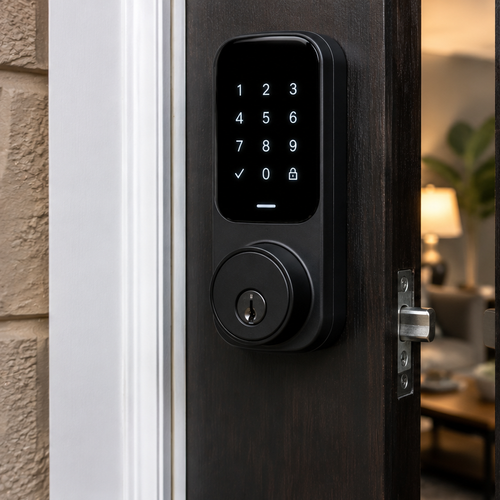
A smart lock takes a deadbolt and adds electronics: a motor to throw the bolt and a way to control it without a key — a keypad code, your phone, a fingerprint, or a connection to your home network. Many keep a physical key backup as well. The lock part can be just as strong as a standard deadbolt; what's added is how you operate it and what it can tell you.
What a Smart Lock Adds
The appeal of a smart lock is everything a metal key can't do:
- Keyless entry — a code or your phone instead of fumbling for keys, and no key to lose or have copied.
- Remote control — lock or open it from anywhere, and check whether you locked up after you've left.
- Guest and temporary codes — give a house cleaner, dog walker, or guest their own code, then delete it later.
- An activity log — see who came and went and when, useful for families and rentals.
- Auto-lock — the door locks itself after a set time, so a forgotten lock isn't a risk.
For a lot of households, that convenience and control is the whole reason to upgrade. No more hiding a spare key under a mat, no rekeying when someone moves out — just delete their code.
The Trade-Offs
The cost of those features depends on power and electronics. Smart locks run on batteries that have to be replaced, and a dead battery can lock you out if there's no key backup (most have one for exactly this reason). They have software that may need updates, and connected models can have the same security considerations as any networked device, so a strong, unique code and keeping the app updated matter. They also cost more up front than a standard deadbolt. None of this makes them insecure — it just means there's more to maintain than a purely mechanical lock.
| Factor | Traditional Deadbolt | Smart Lock |
|---|---|---|
| Entry | Physical key | Code, phone, fingerprint (often key backup) |
| Power | None needed | Batteries; needs replacing |
| Remote control | No | Yes, on connected models |
| Guest access | Spare key or rekey | Temporary codes you can delete |
| Up-front cost | Lower | Higher |
| What can fail | Mechanical wear | Batteries, software, plus mechanical |
Which Belongs on Your Door
Here's the practical way to decide. If you want simple, maintenance-free security and don't care about keyless features, a high-quality deadbolt is all you need — and a cheap smart lock is not an upgrade over a good deadbolt. If the keyless conveniences truly fit your life — you share access with family or workers, run a short-term rental, hate carrying keys, or want to check the door remotely — a smart lock adds real value, as long as you keep the batteries fresh and use a strong code.
Either way, two things matter more than the smart label: choose a lock with a strong security rating (look for a high ANSI/BHMA grade), and have it installed properly with a solid strike plate and long screws into the door frame. A poorly installed lock of any kind, or a flimsy strike plate, is the real weak point — most break-ins exploit the door and frame, not the lock cylinder. Get the grade and the installation right, and both a deadbolt and a smart lock can guard your door well. It's also worth thinking about your door itself: a solid-core or metal door in a sturdy frame backs up whatever lock you choose, while a hollow or weathered door undercuts even the best one. A locksmith can look at the whole opening — door, frame, strike, and lock together — and tell you where the real vulnerability is, which is often cheaper to fix than people expect.
Frequently Asked Questions
They can be, because most smart locks are deadbolts with electronics added — the mechanical lock is often the same. Security depends on the lock's grade, the strength of the bolt and strike plate, and the installation, not on whether it's smart. A well-made, well-installed smart lock is as secure as a comparable deadbolt; a cheap one isn't an upgrade over a quality mechanical lock.
Most smart locks warn you when the battery is low, and most include a physical key backup, so a dead battery doesn't lock you out. Some also let you jump-start them with an external power source. Keeping fresh batteries and not ignoring the low-battery alerts avoids the problem. If a model has no key backup, that's worth weighing before you buy.
Connected smart locks are networked devices, so they carry the same general considerations as any device on your network — which is why a strong, unique access code and keeping the app and firmware updated matter. In practice, most break-ins target the door and frame, not the lock's electronics. Choosing a reputable brand and following basic security habits keeps the risk low.
For many homes, yes. A high-quality deadbolt with a strong strike plate and proper installation is solid, proven security with nothing to maintain. A smart lock adds convenience and access control, not necessarily more raw security. If you don't need keyless features, a good deadbolt is plenty — just make sure it's a strong grade and installed correctly into the frame.
Look first at the security grade — a high ANSI/BHMA grade indicates a stronger, more durable lock — and at the strike plate and installation, since the door frame is where most attacks succeed. For a smart lock, also weigh battery life, whether it has a key backup, and how access codes are managed. The grade and installation matter more than the smart features for actual security.
Pick for Your Life, Build for Security
Smart lock versus deadbolt isn't really a security showdown — most smart locks are deadbolts underneath. The honest question is whether keyless entry, remote control, and guest codes are worth the cost and the batteries for how you live. If they are, a quality smart lock is a great upgrade; if not, a strong deadbolt is all you need. Whichever you choose, a high security grade and a proper, solid installation are what actually keep the door shut.
Choosing a lock for your front door? — Get expert help picking and properly installing the right deadbolt or smart lock. KwikPick Lock and Safe serves the Phoenix West Valley. Call (623) 300-1889.
