
Keypad Lock Failing After a Hot Spell? 5 Likely Causes
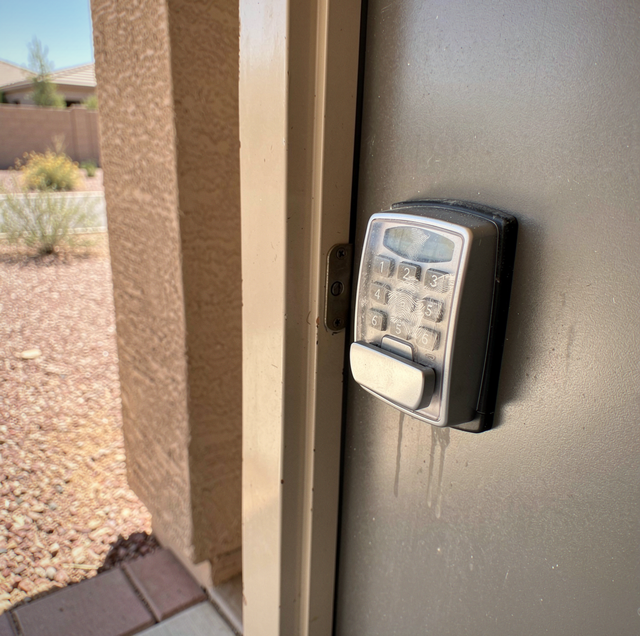
You press the last digit. The lock gives the same accept tone it always gives, the motor whirs somewhere inside the door, and the bolt does not move. You try again and nothing about the response changes, right down to the bolt that stays put. On the third try, the keypad goes dark before you finish the code.
Nothing about the lock changed overnight. What changed was a long stretch of extreme heat, and the lock spent all of it bolted to a door that was soaking it up.
Quick Answer: A keypad lock that starts to miss after sustained heat usually has an electrical fault behind it, while the mechanism itself remains sound. Heat drops battery output, stresses the board and contacts, tires the keypad layer, and makes the motor pull harder.
Electronic locks fail differently from mechanical ones. Between your finger and the bolt sits a chain of parts: cells, a circuit board, a keypad layer, a small motor, a gear train, and a bolt that has to land in a strike. Heat pushes on every link in that chain, and the symptom at the door depends on which link gave out first. Tracing the failure from the power source outward is the quickest way to separate a battery problem from a lock problem.
Heat and the Battery in the Door
Almost every residential keypad lock runs on alkaline cells in a tray inside the interior half of the lock. Alkaline chemistry makes current through a reaction, and reactions speed up as they warm. A warm cell self-discharges faster than a cool one, so a set of cells can quietly lose capacity through a hot stretch without the lock being used much.
The larger issue is internal resistance. Every cell has some, and heat and age together raise it, partly because the electrolyte dries and partly because the electrode chemistry degrades. Internal resistance is invisible at rest. A cell carrying a lot of it can sit in the tray reading like a healthy cell and still fall on its face the instant something asks it for real current.
That matters because of the way a keypad lock draws power. For most of the day it draws almost nothing. It sleeps, wakes when you touch it, lights the keys, checks the code, and then runs a motor for a second or so. That second is the only moment the lock asks for serious current, and it is exactly the moment a heat-tired cell cannot deliver it.
What Heat Does to the Board and the Contacts
On most designs, the electronics live in the interior escutcheon, the keypad lives outside, and a ribbon cable runs between them through a hole bored in the door. Heat works on that assembly in two ways that do not look like heat damage at all.
The first is movement at the connections. Metal terminals, plastic housings, and the board all expand at different rates. Every hot day and cooler night is one cycle, and each cycle nudges a crimped terminal, a spring battery contact, or a ribbon connector a fraction of the way toward loose.
The second is water, which sounds wrong in the middle of a hot spell but follows straight from it. The cavity inside a door holds air, and that air holds moisture. When the exterior face is baking, and the interior face is in conditioned air, the coolest surfaces in the assembly are on the inside, where moisture condenses. That is the side where the board and the battery contacts are. Add the small standing voltage across a battery terminal and two dissimilar metals, and corrosion starts in the one spot where added resistance does the most harm.
A contact wearing a dull gray or greenish film can still pass the tiny current that lights a keypad. It often cannot pass the much larger current a motor wants. The lock beeps, takes the code, and does nothing, which reads to most people as a broken lock rather than a dirty contact.
The ribbon cable deserves a look too. Its film goes brittle with heat and age, and its tightest bend is usually right where it turns through the door edge. A cracked conductor there produces failures that come and go depending on how the door is standing.
Cells that cook in a hot door can vent and leak. If the tray looks wet, crusted, or discolored, treat it as caustic residue: wear gloves, keep it off skin and eyes, and do not scrape flakes into the board below.
The Keypad Surface Itself
Two constructions dominate. A membrane keypad consists of a printed layer, a thin spacer, and a contact layer; pressing a digit collapses a dome or brings two traces into contact. A capacitive panel has no moving parts and senses changes in electrical charge as a fingertip approaches the surface.
Heat treats them differently. On a membrane keypad, the adhesive holding the layers together softens while hot, and the spacer takes a set, so keys begin registering presses you did not make or refusing the ones you did. The overlay itself hazes, stiffens, and eventually cracks with prolonged sun exposure, allowing dust and moisture to reach the traces beneath.
On a capacitive panel, the surface is part of the sensor. A film of skin oil, sunscreen, sweat, salt, and fine dust sits between your finger and the sensing layer, changing what that layer reads. The panel also drifts as it heats, and a drifting baseline shows up as digits that double-register or drop out.
Long sun exposure creates a security problem alongside the functional one. The digits in a code that has not changed in years wear differently from the ones around them, which is reason enough to rotate codes on a schedule and wipe the pad down when you do.
The Motor and the Bolt under Load
The motor in a keypad lock is small, and it is geared down so hard that it produces enough torque to drive a bolt. Like any DC motor, it draws far more current when something holds it back than when it spins free. Resistance does not curb its appetite; it feeds it.
A car battery on a hot afternoon can read perfectly healthy sitting still and then collapse the moment the starter pulls on it, because the load exposes what the resting reading hides. Cells in a door lock behave the same way, and the motor is the starter in that comparison. The second it runs is the only test that means anything.
When voltage at the board dips far enough during that second, the board can reset mid-cycle. That produces the sequence people describe most often: the accept tone, a whir, a bolt that moves partway or not at all, and then a keypad that goes dark. The lock read your code correctly, then ran out of usable power mid-job.
Many of these locks also have a mechanical fuse. A slip clutch or plastic gear is built to give way rather than let the motor tear itself apart against a bolt that will not move. Heat softens plastic, and a softened clutch or gear gives way sooner than it should, so the motor spins happily while the bolt sits still.
When the Bolt Has to Fight the Frame
A door and its frame do move as they heat, and a bolt that has to shove past a shifted strike is a mechanical complaint with mechanical fixes. What belongs here is what that resistance does electrically.
Every throw against a tight strike is a high-current throw. A set of cells gets spent well ahead of schedule, because each cycle burns far more energy than a clean throw does. That is how a lock can eat a fresh set of batteries and still test fine on a bench.
The error behavior follows from the same thing. Many locks watch how long the motor runs and how hard it pulls, and report a jam when the bolt does not reach its stop in the expected time. Some retry on their own. Some enter an auto-relock cycle and try again a minute later, and again after that, each attempt at full stall current. A lock caught in that loop can flatten good cells overnight and, the next morning, present as a battery failure.
The tell is what the lock does when it is not fighting anything.
With fresh cells in, run the bolt a few times with the door standing open. A motor that throws it cleanly in open air but stalls when the door is shut points at the strike, not at the electronics.
Working Through the Ladder at the Door
Get inside safely first: If the lock has a mechanical key cylinder, use the key. If it does not, follow the manufacturer's own procedure in the manual that came with the lock. If neither gets you in, call someone rather than start pulling hardware apart.
Turn the bolt by hand: With the door standing open, throw and retract the bolt with the interior thumbturn. If it feels stiff or gritty by hand, the electronics are not your first problem.
Listen at the moment you enter the code: Silence points at power, the board, or the keypad. A whir with no bolt movement points at the clutch or the gear train. A single click and nothing points at a motor trying to start and stalling.
Change every cell at once: Use one fresh package, all the same brand, and seat the tray fully. Mixed-age cells fail at the pace of the weakest one, and a tray that is not seated behaves exactly like a dead lock.
Watch the keypad while the motor runs: A backlight that visibly dims at the instant of the throw is voltage sagging under load, which points back at the cells or a resistive contact rather than the motor.
Look at the tray and the contacts: Film, crust, or discoloration on the springs is your answer, and a reason to have someone look at the board behind them.
Stop the ladder early in one case. If the interior unit is warm when no one has touched the lock, or if anything about it smells burnt, pull the batteries and stop: current is flowing where it shouldn't. Call a locksmith if the lock still fails with fresh cells, if you can see corrosion anywhere, if the overlay is cracked, or if the bolt will not move by hand. Those are the cases where more pressing on the keypad only drains the new batteries.
Frequently Asked Questions
Check the manual first. Many keypad locks require alkaline batteries because their low-battery warning works by monitoring voltage as it falls along an alkaline discharge curve. Lithium cells hold a higher, flatter voltage and then drop off sharply at the end, so the lock may give no warning at all and simply quit.
No. A dark-finished slab absorbs and stores heat, and metal and fiberglass doors keep radiating it into the cavity for hours after the sun has moved off them. A west-facing door under a deep porch can still be warm well into the evening, and a door opening onto an unconditioned garage gets there with no sun at all.
It usually does. A glass storm door traps a layer of air against the entry door with nowhere for the heat to go, and that pocket runs hotter than the outside air. If your keypad lock sits behind one, venting the storm door or propping it open through the hottest hours takes real heat off the lock.
Almost certainly not. User codes reside in non-volatile memory on the board and survive a complete loss of power, so they remain when fresh cells are installed. What commonly does reset is the internal clock on models that time-stamp entries, along with schedule settings and any auto-lock timer tied to that clock.
Yes, sometimes by a wide margin. A lock with a radio in it keeps a standing draw even when nobody touches the keypad, and one that stays joined to a home network pulls considerably more than one that only wakes for a short-range connection. In an empty house, that quiet draw plus heat can flatten a set of cells before anyone gets back.
Not always. On many residential models, the exterior keypad escutcheon is sold as a serviceable part, so a cracked overlay or dead membrane can be replaced without touching the interior chassis. What usually calls for full replacement is corrosion that has tracked across the board, since that damage rarely stops at one contact.
Fresh batteries in and the bolt still will not throw — a mobile locksmith can test the lock under load right at your door and tell you whether the cells, the contacts, the keypad or the strike is the one at fault. KwikPick Lock and Safe serves the Phoenix West Valley. Call (623) 300-1889.
